Recommended · No download needed
Use our free e-juice calculator right in your browser
Works on any device — phone, tablet, Mac, or PC, with nothing to install. Enter your target nicotine strength, batch size, PG/VG ratio, and flavor percentages, and it gives you the exact milliliters of nicotine base, PG, VG, and flavoring to mix.
Open the free online calculator →Windows desktop app
Prefer a downloadable program? Get Ejuice Me Up
The free desktop version lets you save recipes to your computer, work offline, mix up to 10 flavors at once, and read results in milliliters, drops, or grams.
↓ Download for Windows (.exe)Free digital download — no physical product ships. Windows only (not Mac or iPhone). On a Mac, phone, or tablet, use the online calculator above.
How to make your own vape juice
Mixing your own e-liquid is simpler than it looks — it comes down to a few measurements and a little math, and the calculator handles the math for you. You combine liquid nicotine, propylene glycol (PG), vegetable glycerin (VG), and flavor concentrates — all available in our DIY supplies. If you're working with nicotine, take your time and follow the steps carefully.
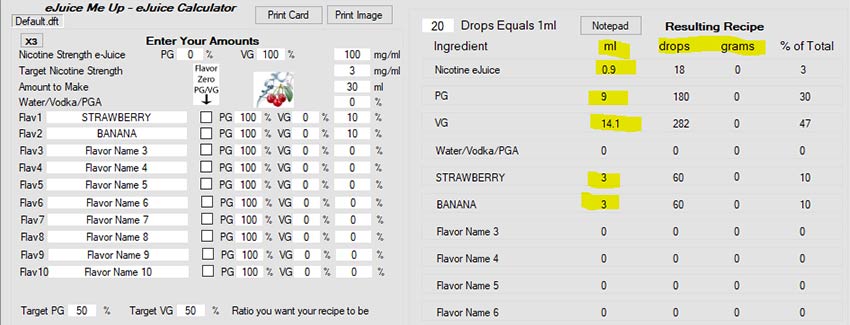
The online calculator above needs no instructions — just fill in the fields. The steps below walk through the downloadable desktop app screen by screen.
Step 1 — Decide your targets
Before you open the calculator, decide on these four things:
- Bottle size (how many mL you want to make)
- Target nicotine strength (mg/mL)
- Flavor percentage (up to 10 different flavors)
- PG/VG ratio
Step 2 — Set your nicotine base
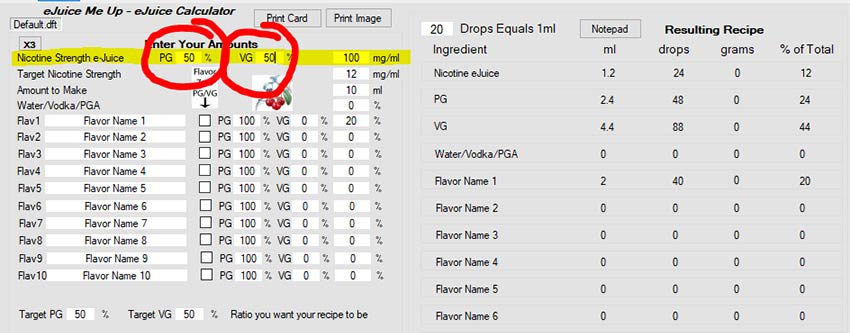
The calculator defaults to a 50/50 PG/VG nicotine base, but nicotine from Central Vapors is sold in either 100% PG or 100% VG base. Change the PG or VG field to 100 depending on which base you have. The example below uses 100% VG nicotine.
Step 3 — Confirm your nicotine strength
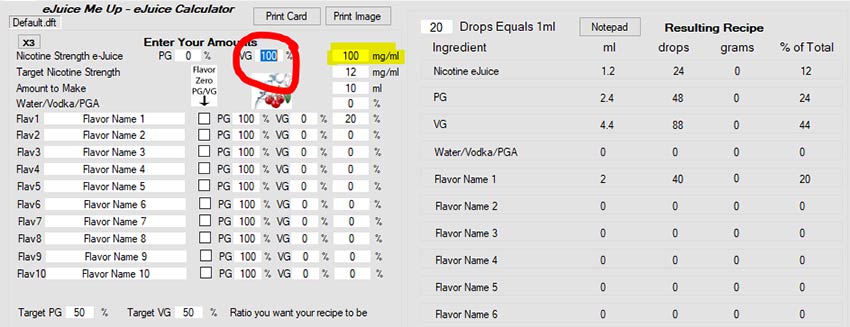
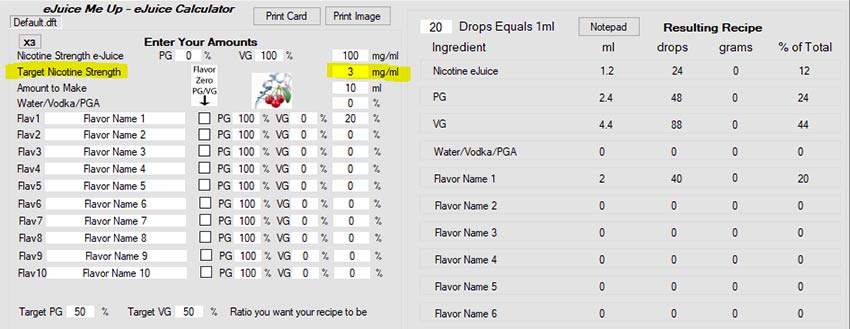
Nicotine from Central Vapors is 100 mg/mL. Make sure that value is entered in the nicotine strength field (highlighted in yellow). If you're using nicotine from another retailer, check the label and update this field accordingly.
Step 4 — Enter your target nicotine level
Enter your desired finished nicotine strength in the mg/mL field. For this example we're making a 3 mg e-liquid, so enter 3. Keep finished DIY e-liquid at 24 mg/mL or below.
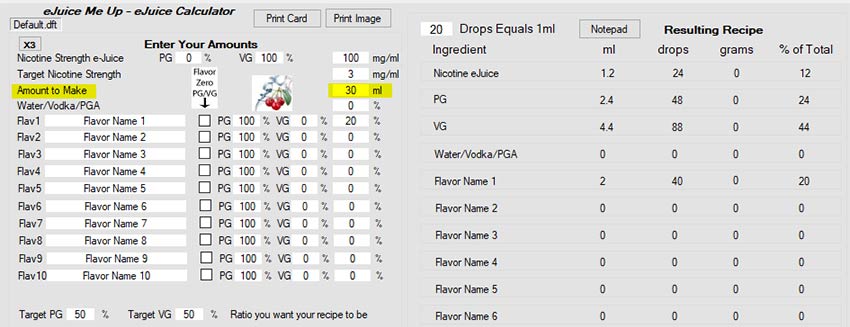
Step 5 — Enter your bottle size
Enter your total batch size in the mL field. For this example we're making a 30 mL batch, so enter 30.
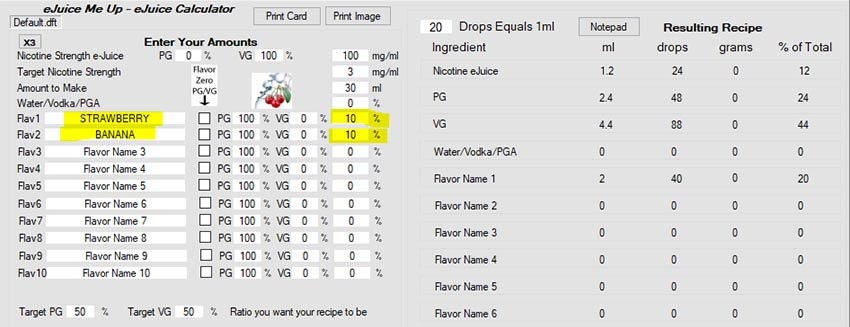
Step 6 — Enter your flavor percentages
Enter a percentage for each flavor you're using. You can add a flavor name if you want, but it's optional. The calculator supports up to 10 flavors. For this example we're using 10% strawberry and 10% banana for a total of 20% flavoring.
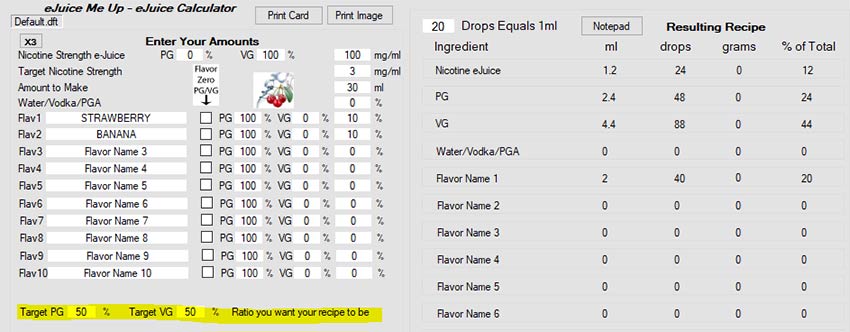
Step 7 — Set your PG/VG ratio
Enter your target PG/VG ratio. The two values must add up to 100. Keep in mind that flavoring is PG-based, so your PG percentage can't be lower than your total flavoring percentage — if you have 30% total flavoring, your PG can't go below 30. For high-VG "Max VG" mixes, it's normal for the recipe to call for zero added PG. For this example we'll use a standard 50 PG / 50 VG ratio.
Step 8 — Calculate and mix
Click Calculate. Your recipe appears on the right in mL, drops, or grams — whichever unit is easiest to work with. Measure everything out, give the bottle a thorough shake, steep if needed, and you're done.
PG vs VG — what's the difference?
PG (propylene glycol) and VG (vegetable glycerin) behave differently in e-liquid, and your ratio changes how the finished juice feels and tastes. Here's a quick comparison:
| Trait | PG (Propylene Glycol) | VG (Vegetable Glycerin) |
|---|---|---|
| Throat hit | More | Less |
| Carries flavor | Better | Less effective |
| Taste | Neutral | Slightly sweet |
| Vapor production | Less | More |
| Viscosity | Thin | Thick |
Measuring tips
When measuring small batches in drops, roughly 20 drops equals 1 mL — though this varies with liquid thickness. Thicker VG-heavy mixes produce larger drops, so drops-per-mL will be lower. For the most accurate results, use a graduated syringe or cylinder rather than counting drops.
For use by adults 21+. Nicotine is an addictive chemical — handle and store liquid nicotine with care, and keep it away from children and pets.